
Help & KYC
Inside Slotornado Casino: Documents, deposit and withdrawal steps, app install, support.
Verification & Documents
Verification
Slotornado Casino in short: Profile → Verification. Three fields: identity, address, payment. One clear photo or scan each.
Uploads and withdrawals are reviewed. More may be requested. Matching names speed it up.
Documents
ID document
Passport, ID card, driving licence or other official document.
Address document
Utility bill, phone bill or bank statement: full name and address.
Payment document
Online-banking screenshot or photo, statement or Skrill page: deposit visible.
JPG, PNG, PDF. Max 10 MB per file.
Deposits & Withdrawals
Deposits
Inside Slotornado Casino: Deposit button: methods and minimums. Seen: crypto (BTC from 0.00035, LTC from 0.5, USDT from 20), MiFinity, open banking from C$30 equivalent.
Enter the bonus code before paying. Not after.
Withdrawals
On the Slotornado Casino site: Cashier → Withdraw. Method, amount. Active-bonus wagering must be complete. Every request is checked. Identity and payment details may be requested.
Bonus winnings have caps. Check the offer you used.
App
Web app. No store. Steps below.
Android
 1
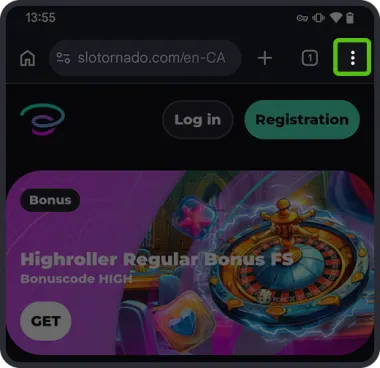
Open the site in Chrome. Tap the ⋮ menu.
 2
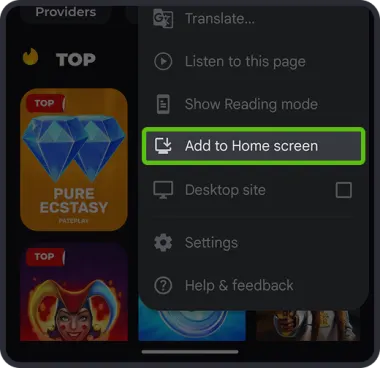
Select “Add to Home screen”.
 3
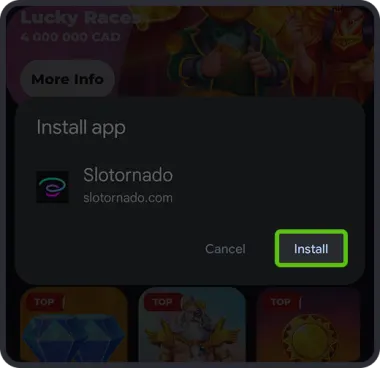
Confirm with “Install”.
iOS
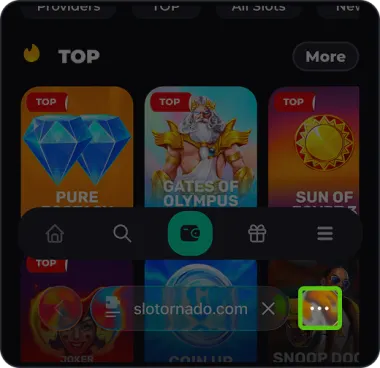 1
Open the site in Safari. Tap the ··· in the address bar.
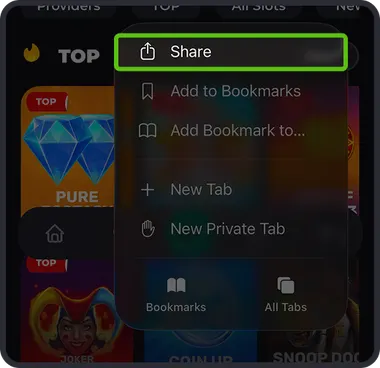 2
Tap “Share”.
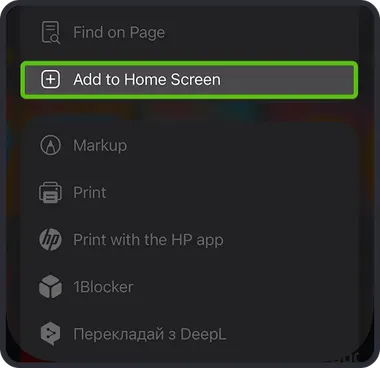 3
Select “Add to Home Screen”.
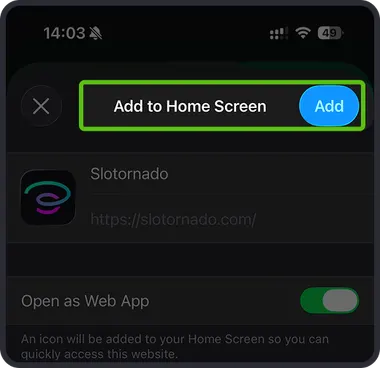 4
Tap “Add” at the top right.
Support
Slotornado Casino players get this: Live chat: corner of every page. Email: support@slotornado.com. Include player ID, short description, screenshots.